Update Billing Details
Who can use this guide?
Account Owners and Admins
Pro and Business
Billing Contact
The Billing Contact details are the information that will be on the invoices we send to you when you're billed, and the Billing Email is where we will send them. You can add details like your VAT number, Address, and Name on the invoice. Note that a VAT number is required for reverse VAT charges to populate correctly on the invoice.
Payment Method
The Payment Method is the credit or debit card that we'll charge for your subscription fees, and can also be updated with the Edit button. We currently accept Visa, Mastercard, or American Express payments. We don't accept PayPal or bank transfer at this time.
Log in to your account. On the left side of the dashboard, click on Subscription. You will then be able to update your payment information, make changes to your plan size (if on an applicable plan), view past invoices, and update your billing details:
Billing email and country
Payment method
Invoice details such as name, address, and VAT number
Plan size
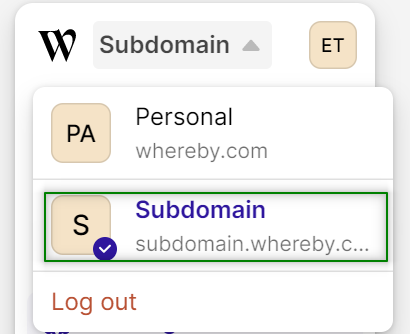
For Business and some legacy accounts, you may need to use the Account Picker in the top left corner of your Dashboard to make sure that you are viewing your paid account, which will have a unique subdomain.